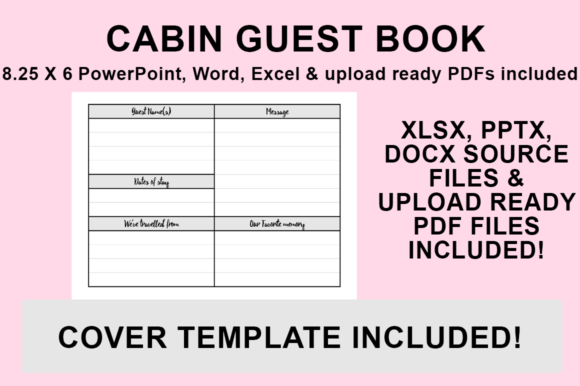
KDP Interior - Cabin Guest Book: Customizable Templates for Hosts and Publishers
Creating a memorable experience for cabin guests goes beyond fresh linens and a stocked kitchen. It extends to the small details that make a rental feel personal and cherished. A KDP Interior - Cabin Guest Book serves as both a functional log for visitors and a lasting memory keeper for hosts. Unlike generic, pre-printed books that force you into a specific layout, this digital template package offers complete creative control. By providing editable PowerPoint, Word, and Excel source files alongside a print-ready PDF, this resource bridges the gap between professional publishing standards and personal customization.
For Airbnb hosts, VRBO owners, and self-publishers, the ability to modify the interior means the guest book can match the exact aesthetic of the property. Whether your cabin is a rustic log retreat in the Smokies or a modern A-frame in the Pacific Northwest, the design should reflect that atmosphere. This template set removes the technical barriers of book formatting while ensuring the final product meets Amazon KDP’s strict printing specifications. The included 8.26″ x 6″ size with no bleed configuration is specifically optimized for landscape journals, making it an ideal format for guest entries, sketches, and photo pasting.
Why Editable Source Files Matter for Rental Hosts
Many low-content book creators rely solely on static PDFs. While convenient, static files limit your ability to adapt the book to your specific needs. The inclusion of PowerPoint, Word, and Excel source files transforms this KDP Interior - Cabin Guest Book from a simple product into a flexible branding tool. Real-world hosting scenarios often require unique adjustments that a fixed template cannot accommodate.
Consider a host who manages multiple properties with different themes. With editable source files, they can create a unified series where the interior structure remains consistent, but the headers, fonts, and graphics change to match each location. A lakeside cabin might feature nautical typography and blue accents, while a mountain retreat uses earthy tones and serif fonts. This level of differentiation helps build a recognizable brand across a portfolio of rentals without requiring advanced graphic design skills or expensive software subscriptions.
Furthermore, Excel integration offers practical utility for data-driven hosts. Some property managers prefer to track guest metrics, maintenance notes, or supply inventory directly within the guest book ecosystem. Having an Excel component allows for the creation of structured logs or checklists that can be printed and bound into the book, turning a standard guest register into a comprehensive property management tool.
Practical Applications Across Different Settings
The versatility of this template extends far beyond short-term vacation rentals. Understanding where and why different users apply this KDP Interior - Cabin Guest Book reveals its broader value proposition.
Short-Term Rental Businesses
For Airbnb and VRBO hosts, the guest book is a critical touchpoint for gathering feedback and encouraging repeat bookings. Using this template, hosts can insert custom welcome letters, Wi-Fi instructions, and local recommendation pages directly into the bound volume. Instead of leaving loose papers that get lost or damaged, essential information becomes part of the permanent record. Hosts can also add specific prompts tailored to their property, such as "What was your favorite hiking trail?" or "Share a photo from your stay," which generates user-generated content and authentic reviews.
Private Family Cabins and Retreat Centers
Families with multi-generational cabins often struggle to preserve history. Digital photos get lost in cloud storage, and paper notes fade. A customized guest book created with these templates allows families to design a legacy archive. They can include family tree graphics, historical timelines of the property, or dedicated sections for recipes cooked in the cabin kitchen. Because the files are editable, family members can update the template annually before printing a new volume, ensuring the tradition evolves with the family.
Educational and Corporate Retreats
Organizations that own conference centers or educational lodges need guest books that serve dual purposes: visitor logging and institutional memory. Program directors can use the Word and PowerPoint files to add organizational logos, mission statements, or reflection prompts relevant to their workshops. For corporate retreats, the book can include team-building exercises or goal-setting pages, transforming a passive sign-in sheet into an active engagement tool.
Self-Publishers and Low-Content Creators
For entrepreneurs selling on KDP, niche specificity drives sales. Generic "cabin guest books" face high competition. However, creators using these source files can develop hyper-targeted products. Examples include "Glamping Guest Books," "Hunting Lodge Registers," or "Yoga Retreat Journals." The ability to change fonts and add niche-specific graphics allows publishers to test different market segments rapidly without redesigning the entire interior from scratch.
Customization Features That Drive Engagement
The visual appeal of a guest book influences whether guests actually take the time to write in it. A sterile, spreadsheet-like layout feels administrative, while a thoughtfully designed page invites contribution. This KDP Interior - Cabin Guest Book template empowers users to select fonts and styling that evoke emotion.
- Typography Selection: Changing a standard sans-serif font to a handwritten script for headers can instantly make the book feel warmer and more inviting. Users can pair readable body text for instructions with decorative display fonts for section titles.
- Graphic Integration: The PowerPoint and Word files support easy image insertion. Hosts can add maps of the property, illustrations of local wildlife, or border elements that frame the writing space. These visuals break up text-heavy pages and provide inspiration for guests who may not know what to write.
- Prompt Engineering: Blank lines can be intimidating. Editing the template to include specific questions or themed sections (e.g., "Morning Coffee Thoughts," "Evening Campfire Stories") guides guests toward meaningful entries rather than perfunctory signatures.
Technical Considerations Before Publishing
While the creative possibilities are extensive, successful publication requires attention to technical details. Users should consider several factors before applying, downloading, or uploading this KDP Interior - Cabin Guest Book.
Trim Size Verification: The files are preset to 8.26″ x 6″ with no bleed. This is a specific landscape dimension supported by KDP. Users must ensure their cover file matches these exact dimensions. Attempting to resize the interior to a different trim size after customization can disrupt margins and safe zones, leading to rejection during the upload process.
Font Licensing: When customizing fonts to put your own stamp on the book, verify that any new typefaces used are licensed for commercial use if you intend to sell the book. For private cabin use, licensing is less critical, but for KDP publishers, compliance is mandatory. Stick to system fonts or verified open-source libraries when modifying the template.
Margins and Safe Zones: Even though the template is pre-formatted, adding extensive graphics or changing text blocks can shift elements into the gutter or trim area. Always preview the PDF at 100% zoom before uploading to check that all content sits comfortably within the safe zone. The no-bleed specification means all content must have adequate white space around the edges.
Streamlined Export Process for KDP Upload
One of the most common pain points for new publishers is generating a print-ready PDF that maintains formatting integrity. This template simplifies that workflow through standard office software. Follow this precise process to ensure your customized KDP Interior - Cabin Guest Book uploads without errors:
- Finalize Your Design: Open your desired source file (PowerPoint, Word, or Excel) and complete all customizations. Double-check font embedding permissions and image resolution (300 DPI recommended for print clarity).
- Navigate to Save Options: Go to ‘File’ and select ‘Save As’. Do not use ‘Export’ unless necessary, as ‘Save As’ often provides more granular PDF settings in Office applications.
- Select Destination: Choose a dedicated folder for your KDP assets to keep versions organized. Naming conventions like "CabinGuestBook_v2_Final.pdf" help prevent uploading draft versions.
- Choose Correct Format: From the ‘Save as type’ dropdown, strictly select PDF (.pdf). Avoid PDF/A or other archival formats unless specifically required, as standard PDF preserves the layout fidelity needed for KDP's previewer.
- Execute and Verify: Click Save. Once generated, open the PDF independently of your editing software to confirm that all fonts rendered correctly and no elements shifted during conversion. The file is then ready for immediate upload to KDP.
By leveraging editable source files instead of static templates, hosts and creators gain the agility to produce guest books that are genuinely useful and aesthetically aligned with their environment. Whether managing a commercial rental, preserving family heritage, or building a publishing portfolio, the KDP Interior - Cabin Guest Book provides the foundational structure needed to create something distinctive. The combination of technical compliance and creative freedom ensures that the final product serves its intended audience effectively, turning a simple book into a valued part of the cabin experience.