Creating Custom KDP Interiors: A Guide to Random Act of Kindness Templates in PowerPoint, Word, and Excel
The self-publishing landscape on Amazon KDP has evolved significantly over the last few years. While low-content books like journals and notebooks were once the primary entry point for new publishers, the market now demands higher value, more engagement, and unique aesthetics. Enter the Random Act of Kindness (RAK) interior. This niche combines the therapeutic benefits of mindfulness with the interactive nature of activity books, creating a product that resonates deeply with readers seeking positivity and connection.
However, simply uploading a generic PDF is no longer a guaranteed path to success. To truly stand out, creators need flexibility. This is where editable source files in PowerPoint, Word, and Excel become invaluable assets. Unlike static templates, these editable formats empower you to customize every aspect of your book, ensuring your Random Act of Kindness interior is not only print-ready but also uniquely yours. Understanding how to leverage these tools is essential for modern KDP publishers who want to build a sustainable brand rather than just upload a file.
The Significance of Editable Source Files in Self-Publishing
Many beginners assume that a "print-ready PDF" is all they need. While a pre-formatted PDF is convenient for immediate upload, it lacks long-term viability. If you rely solely on static files, your book will look identical to every other publisher using that same template. In a saturated marketplace, differentiation is key to visibility and sales.
Editable source files solve this problem by giving you full creative control. When you acquire a Random Act of Kindness template package that includes PowerPoint, Word, and Excel files, you are purchasing a foundation, not a finished product. This distinction is crucial for adhering to Amazon’s quality guidelines and for building a loyal audience. Readers can often tell when a book is a mass-produced clone versus a thoughtfully curated experience. By modifying fonts, adjusting layouts, and adding proprietary graphics, you transform a standard template into a branded product that reflects your specific voice and mission.
Why Multiple Formats Matter
You might wonder why a template package would include three different software formats. Each serves a distinct purpose in the design workflow:
- PowerPoint: Often overlooked as a design tool, PowerPoint is exceptionally powerful for KDP interiors. It handles visual elements, shapes, and image placement with ease. For RAK books, which often require decorative borders, icons, and varied layout structures, PowerPoint offers an intuitive drag-and-drop interface that is faster than professional design software for many users.
- Microsoft Word: Best for text-heavy pages such as introductions, instructions, or journaling prompts. Word’s superior typography controls and paragraph styling make it ideal for ensuring readability and professional formatting of written content.
- Excel: Surprisingly useful for structured content. If your Random Act of Kindness book includes trackers, checklists, grids, or calendars, Excel ensures perfect alignment and consistent spacing that is difficult to achieve manually in other programs.
Understanding Technical Specifications: 6x9 No Bleed
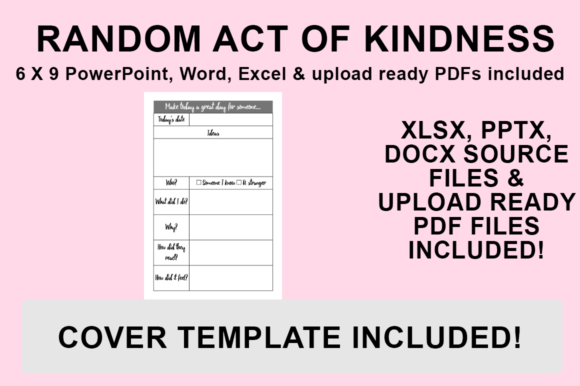
Before customizing your files, it is vital to understand the technical constraints provided. The templates described here are designed specifically for a 6″x9″ trim size with NO BLEED. This specification dictates your entire design strategy.
"No bleed" means that no ink extends to the very edge of the paper. Amazon KDP requires a safety margin for non-bleed books to prevent content from being trimmed off during manufacturing. Typically, you must keep all text and critical graphics at least 0.25 inches (6.4mm) away from the outer edges, and slightly more from the gutter (the inner binding edge). Because these templates are pre-sized to 6x9 without bleed, the safe zones are likely already accounted for in the master slides or page setup. However, whenever you add new graphics or move elements, you must respect these margins. Violating safe zones is the most common reason for KDP rejection, so always verify your measurements after customization.
Customization Strategies for Standing Out
Having the tools is only half the battle; knowing how to use them effectively separates successful publishers from amateurs. Here is how to put your own stamp on these templates to ensure your Random Act of Kindness book stands out.
Typography and Branding
Fonts convey emotion. A RAK book intended for children should utilize playful, rounded sans-serif fonts, while a version for corporate wellness might benefit from clean, modern typography. Since the source files are editable, replace the default fonts with licensed commercial-use fonts that match your brand identity. Consistency in font pairing across your series helps build brand recognition.
Graphic Integration
The prompt encourages adding graphics to differentiate your product. Consider incorporating hand-drawn elements, watercolor splashes, or custom vector illustrations that relate to kindness themes. Even simple changes, such as altering color palettes from standard black-and-white to soft pastels or bold primaries, can create a completely different user experience. Ensure all added graphics are high resolution (300 DPI) to avoid pixelation in print.
Content Personalization
Don't limit yourself to the pre-written acts of kindness. Use the editability to tailor content to specific niches. You could create a "Random Acts of Kindness for Teachers," "for Nurses," or "for Teens" version simply by tweaking the text in Word or PowerPoint. Niche specificity reduces competition and increases relevance to your target reader.
Step-by-Step Guide: Exporting Your Customized PDF for KDP
Once you have customized your interior, you must export it correctly. KDP requires a flattened, high-quality PDF. Follow this precise workflow to ensure your file is upload-ready.
- Final Review: Open your desired file (PowerPoint, Word, or Excel) and perform a thorough check. Verify that all fonts are embedded or standardized, images are high-resolution, and no elements violate the no-bleed safety margins. Make any final changes to formatting or graphics.
- Navigate to Save As: Go to the ‘File’ menu in your application and select ‘Save As’. Do not use ‘Export’ unless necessary, as ‘Save As’ often provides more granular control over PDF standards in Microsoft Office applications.
- Select Destination: Choose a dedicated folder for your KDP assets. Organizing your files by project prevents version control issues later.
- Choose PDF Format: From the ‘Save as type’ dropdown menu, strictly select PDF (.pdf). Avoid formats like .docx or .pptx for upload. Ensure the optimization setting is set to "Standard (publishing online and printing)" rather than "Minimum size," as compression can degrade print quality.
- Save and Verify: Click Save. Before uploading to KDP, open the newly created PDF in a viewer like Adobe Acrobat to confirm that the dimensions read exactly 6x9 inches and that the visual quality meets your expectations. The file is then ready for upload to KDP.
Combining Files and Managing Multi-Source Projects
A significant advantage of having source files in multiple formats is the ability to combine them. You might design your title page and visual spreads in PowerPoint, write your introduction in Word, and create tracking sheets in Excel. To create a single upload-ready PDF, you will need to merge these exports.
Use reliable PDF merging tools (such as Adobe Acrobat Pro, PDFsam, or reputable online mergers) to assemble your final manuscript. Always maintain the correct page order and ensure that the combined file retains the 6x9 dimensions throughout. If you are combining these RAK templates with other PDFs you already own, double-check that the trim sizes match. Mixing a 6x9 RAK interior with an 8.5x11 journal interior will result in printing errors or automatic resizing that ruins your layout.
Best Practices for Ethical and Effective Publishing
While editable templates provide a shortcut, they come with responsibilities. Always review the licensing agreement of your template purchase. Most commercial licenses allow you to modify and sell the end product as a book but prohibit reselling the template itself or sharing the source files. Respecting intellectual property protects the ecosystem for all creators.
Furthermore, focus on value creation. A Random Act of Kindness book should genuinely inspire action. Test your customized interior by printing a sample copy via KDP or a local printer. Seeing the physical product reveals issues with contrast, gutter margins, and paper opacity that screens cannot show. This step is non-negotiable for professional results.
Conclusion
The shift toward editable KDP interiors represents a maturation of the self-publishing industry. By utilizing PowerPoint, Word, and Excel source files for your Random Act of Kindness books, you gain the agility to adapt to market trends, the ability to create unique branded experiences, and the technical control necessary for high-quality production. Whether you are a seasoned publisher looking to streamline your workflow or a beginner wanting to learn the ropes of book design, mastering these editable templates is a strategic investment. Remember, the goal is not just to publish a book, but to create a meaningful resource that encourages kindness in the real world. With the right tools and a thoughtful approach to customization, your next KDP project can achieve both commercial success and positive impact.