House Plants Care Journal for KDP: A Practical Guide to Editing and Publishing
Creating a successful low-content book on Amazon requires more than just uploading a generic template; it demands a product that solves a specific problem for a niche audience. The House Plants Care Journal for KDP is designed specifically for plant enthusiasts who need a structured way to track watering schedules, fertilization, and growth patterns. However, many creators overlook the technical nuances of this resource, leading to poor print quality or a confusing user experience. This guide addresses common pitfalls in editing, formatting, and utilizing this journal template to ensure your final product is professional, functional, and profitable.
Understanding the Journal Structure and Purpose
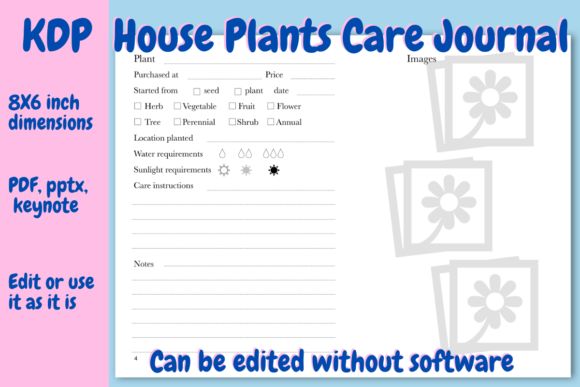
Before opening any file, it is essential to understand what makes this specific journal effective. Unlike blank notebooks, this template is pre-structured with 105 pages in an 8x6 inch landscape format. This dimension is critical because landscape orientation provides ample horizontal space for writing notes and taping photos without cramping the user's hand. The document includes a title page, a copyright page for your brand, and a table of contents for easy referencing.
The core value lies in the two distinct section types. There are 14 dedicated plant profile pages where users record origin, specific needs, and attach progress pictures. Following this, 88 tracking pages feature tables with 15 entries each, allowing for date, watering, fertilizer, height, and general notes. Understanding this layout prevents the common mistake of treating the file as a static PDF rather than a customizable foundation. If you publish the file "as is" without adding your unique branding or adjusting the content to fit a specific sub-niche, your book will likely struggle to stand out in a saturated market.
Avoiding File Format and Compatibility Errors
One of the most frequent issues creators face involves software compatibility. This journal is available in PDF, PPTX, and Keynote formats. A significant misunderstanding is assuming you need expensive design software like Adobe InDesign to edit these files effectively. While professional software offers precision, this specific PowerPoint file was formatted in Google Slides. This means anyone with a free Gmail account can upload, edit, and export the file without purchasing additional software.
Practical Advice: Always test your chosen file format before committing to hours of editing. If you are using Google Slides, upload the PPTX file and immediately check the slide master. Sometimes, fonts or spacing shift during the conversion from PowerPoint to Google’s native format. Verify that the tables remain aligned and that text boxes have not drifted off the printable area. Correcting these alignment issues early saves you from discovering formatting errors only after ordering a proof copy.
The Danger of Ignoring Print Margins and Bleed
Even if the digital preview looks perfect, KDP printing has physical limitations. The 8x6 inch landscape size is non-standard compared to typical 6x9 journals, making margin awareness even more vital. A common error is placing text or table lines too close to the gutter (the inner binding edge). Because this journal uses a landscape format with tables spanning the width, insufficient gutter margin will result in users having to break the spine to write in the leftmost columns.
Ensure you maintain a safe zone of at least 0.375 inches on the outside edges and adequate gutter space based on page count. Since this journal contains 105 pages, the gutter requirement is modest but necessary. When editing in Google Slides or PowerPoint, turn on rulers and guides. Do not rely solely on the visual canvas; measure the actual distance from the edge to your content. If you duplicate pages to increase the number of tracking sheets, double-check that the margins remain consistent across all new slides.
Customization Mistakes That Hurt Usability
Editing capability is a feature, not just a convenience. Many publishers download the House Plants Care Journal for KDP and fail to utilize the customization options, resulting in a generic product. Conversely, some over-edit and break the functional layout. Balance is key.
- Duplicating Pages Correctly: If your target audience grows rare orchids, they may need more than 14 profile pages. Right-click and duplicate the specific profile slide rather than creating a new one from scratch. This preserves the exact table dimensions and font styling. Deleting extra pages works similarly; remove unused tracking pages to reduce printing costs if 88 pages are excessive for your niche.
- Copyright Page Neglect: The template includes a dedicated copyright page. Failing to add your brand name here is a missed opportunity for professionalism and intellectual property protection. Simply replace the placeholder text with your publishing imprint. This small detail signals to buyers that the book is a legitimate product, not a stolen asset.
- Table Functionality: The tracking tables are designed for 15 entries per page. Avoid resizing rows to fit more entries unless you have tested the writing space. Cramming 20 entries onto a page designed for 15 makes the journal unusable for people with average handwriting. Prioritize user experience over maximizing page density.
Evaluating Cost and Profitability Before Publishing
Financial miscalculations often stem from ignoring the relationship between page count and printing cost. This 105-page journal has a tested printing cost of approximately $2.15 USD. This figure is crucial for setting your retail price. A common mistake is pricing the book based on perceived value rather than actual production costs plus royalty thresholds.
Because the file is editable, you have control over this variable. If you intend to sell the journal at a lower price point to attract beginners, consider reducing the tracking pages from 88 to 60. Recalculate the printing cost after deletion; saving $0.30 per unit can significantly impact your margin at scale. Conversely, if you are targeting serious collectors willing to pay a premium, adding extra note pages or care reference guides can justify a higher price, provided the increased printing cost doesn't erode your profit. Always use the KDP calculator with your final edited page count, not the original template count.
Ensuring Quality Through Preview Testing
The document has been tested on the KDP preview tool, but your edits introduce new variables. Never skip the preview step after modifying the file in Google Slides or PowerPoint. Export your final version as a high-resolution PDF (not a standard office PDF) to preserve vector quality for tables and text. Upload this PDF to KDP and launch the previewer.
Check specifically for:
- Text Clarity: Zoom in to 100% to ensure table lines are crisp and not pixelated.
- Page Order: Confirm that the Table of Contents matches the actual page numbers after any additions or deletions.
- Color Consistency: If you changed any elements from black and white to grayscale or color, verify that the contrast remains high enough for comfortable reading and writing.
Making an Informed Decision
Before purchasing or downloading the House Plants Care Journal for KDP, assess your technical comfort level and business goals. If you require a completely unique layout that deviates significantly from the provided structure, this template may serve only as inspiration rather than a direct solution. However, for creators seeking a validated, tested foundation that eliminates the guesswork of margin setup and table design, it offers substantial efficiency.
Verify that you have access to Google Slides or compatible software before starting. Ensure you understand how to export print-ready PDFs. Most importantly, view this journal as a collaborative tool between you and the end-user. Your role is to refine the template so that the plant lover buying your book feels understood and supported. By avoiding formatting errors, respecting usability constraints, and strategically managing page counts, you transform a simple digital file into a valuable physical product that serves both your business and the gardening community.