KDP Interior Dream Journal: Customizable 6x9 Templates
Creating a unique low-content book for Amazon KDP often comes down to the quality and flexibility of your interior files. The KDP Interior - Dream Journal template collection provides a practical solution for publishers who want to move beyond generic, pre-made PDFs. Instead of being locked into a static design, this resource offers fully editable source files in PowerPoint, Word, and Excel. This accessibility allows you to modify every aspect of the layout, ensuring your final product aligns perfectly with your brand identity or specific niche requirements.
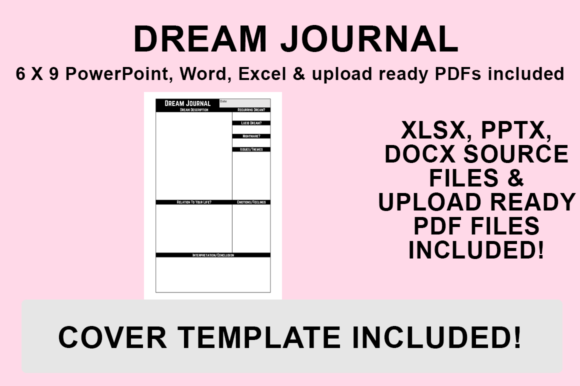
At its core, this dream journal interior is designed to streamline the publishing process while maximizing creative control. It includes a print-ready PDF for immediate upload, but the true value lies in the source files. Whether you are a seasoned self-publisher looking to expand your catalog or a beginner wanting to learn the mechanics of book formatting, having access to the original design layers makes a significant difference. You can adjust margins, swap fonts, add custom graphics, or restructure prompts without needing expensive graphic design software like Adobe InDesign.
Why Editable Source Files Matter for Publishers
Many KDP interiors are sold as flattened PDFs. While convenient, they limit your ability to differentiate your book in a saturated market. When you utilize a KDP Interior - Dream Journal that includes native PowerPoint, Word, and Excel files, you gain the ability to put your own stamp on the product. This customization is essential for building a recognizable series or catering to specific sub-niches within the dream interpretation community.
For example, a journal targeting lucid dreamers might require different tracking fields than one designed for psychological reflection or creative writers seeking inspiration. With editable templates, you can add sections for reality checks, emotion tracking, or sketch spaces in minutes. This flexibility transforms a standard template into a specialized tool that offers genuine value to the end user. It also allows you to test different layouts and styles without purchasing multiple separate products.
Technical Specifications and No Bleed Design
Understanding technical constraints is vital for avoiding printing errors. All files in this collection are specifically sized to fit the popular 6″x9″ trim size, which is ideal for bedside journals due to its portable yet spacious format. Crucially, these templates are designed with NO BLEED. This means all text and graphics stay safely within the designated margin area, eliminating the risk of content being trimmed off during the printing process.
The no-bleed configuration simplifies the upload process significantly. Beginners often struggle with bleed settings, leading to rejected manuscripts or misaligned interiors. By using a pre-formatted no-bleed layout, you ensure consistent margins and a professional appearance right out of the box. This specification applies across all included file types, maintaining consistency whether you choose to edit in Word, Excel, or PowerPoint.
Practical Applications Across Different Niches
The versatility of these templates extends beyond simple dream logging. Entrepreneurs and educators can adapt the KDP Interior - Dream Journal structure for various educational and wellness products. Because the files are compatible with common office software, repurposing them requires no steep learning curve.
- Wellness and Mindfulness: Modify the prompts to focus on gratitude, sleep quality tracking, or morning intention setting alongside dream recall.
- Creative Writing: Adjust the layout to include larger blank spaces for sketching or narrative expansion, appealing to artists and storytellers.
- Therapeutic Tools: Create structured logs for clients working with therapists to identify recurring patterns or emotional triggers.
- Language Learning: Adapt the vocabulary sections for bilingual dream journals, helping users practice new languages through subconscious reflection.
These use cases demonstrate how a single template pack can serve multiple business goals. Rather than viewing the product solely as a dream diary, consider it a foundational layout system for any repetitive daily or nightly tracking journal.
Customizing Your Interior for Market Success
To make your journal stand out, personalization is key. Since the Dream Journal is designed in PowerPoint, Word, and Excel, you can easily integrate unique visual elements. Consider adding proprietary branding, custom illustrations, or specialized typography that matches your cover design. Consistency between your cover and interior builds trust with buyers and encourages repeat purchases.
You might also experiment with functional additions. Adding a dream symbol glossary at the back, a lunar cycle tracker, or an index for easy reference can elevate the perceived value of your book. These enhancements are straightforward to implement when you have full access to the source document structure. Remember that small details, such as choosing a readable font size for low-light reading or including adequate writing space, directly impact customer satisfaction and reviews.
How to Export Your Customized File for KDP
Once you have tailored the template to your needs, proper exportation is critical to preserve your formatting. Follow this precise workflow to generate a high-quality PDF ready for Amazon KDP upload:
- Finalize Your Edits: Open your desired file (PowerPoint, Word, or Excel) and complete all changes, including font adjustments, formatting tweaks, and additional graphics. Double-check that all elements remain within the safe zone.
- Access Save Options: Navigate to the ‘File’ menu in your application and select ‘Save As’. Avoid using ‘Export’ unless necessary, as ‘Save As’ often provides more reliable PDF conversion for print layouts.
- Select Destination: Choose a dedicated folder for your KDP assets to keep your project organized. Naming conventions matter; include the trim size and version number in your filename for future reference.
- Choose PDF Format: From the ‘Save as type’ dropdown menu, strictly select PDF (.pdf). Ensure you are not saving as a Word document or image file, as KDP requires PDF for fixed-layout interiors.
- Save and Verify: Click Save. Before uploading, always open the resulting PDF to verify that fonts embedded correctly and margins appear as intended. The file is then ready to upload to KDP.
Important Considerations Before Publishing
While these templates provide a robust starting point, successful publishing requires attention to detail. Always review Amazon KDP’s current content guidelines regarding duplicate content. Even when using commercial-use templates, significant customization is recommended to create a distinct product. Changing fonts, rearranging page elements, and adding unique introductory content help differentiate your journal from others using the same base files.
Additionally, consider the paper type you intend to select during the KDP setup. Cream paper is generally preferred for journals as it reduces glare and feels warmer to the touch, while white paper offers higher contrast for detailed graphics. Since these templates are designed for standard black and white interior printing, they work seamlessly with both options. However, if you plan to add grayscale images later, ensure they have sufficient resolution (300 DPI) to print clearly on either paper stock.
Finally, remember that the included print-ready PDF serves as an excellent backup or quick-launch option. If you are testing a new keyword niche and want to validate demand before investing time in heavy customization, the ready-made file allows for rapid deployment. You can always update the manuscript later with a customized version once sales data confirms the niche's viability. This strategic approach balances speed-to-market with long-term brand building, making the KDP Interior - Dream Journal a versatile asset for any publisher's toolkit.