Designing a Custom KDP Interior - Food Allergy Journal Using Editable Source Files
The Strategic Advantage of Editable Templates in Self-Publishing
Creating a successful low-content or medium-content book on Amazon KDP requires more than just uploading a generic PDF. The market for health tracking and dietary management is competitive, demanding products that offer genuine utility and distinct visual appeal. Utilizing a KDP Interior - Food Allergy Journal provided as editable source files rather than a static document fundamentally changes the publishing workflow. When creators have access to PowerPoint, Word, and Excel templates, they transition from being mere distributors to active designers. This flexibility allows for the development of a unique intellectual property that stands apart from mass-produced alternatives.
The primary benefit of this multi-format approach lies in customization. A pre-made PDF locks the user into specific fonts, layouts, and margins. In contrast, source files empower the publisher to adjust every element to fit a specific niche audience. For example, a journal targeting pediatric allergy sufferers requires different iconography, font sizes, and language than one designed for clinical researchers or adult elimination diets. By starting with an editable foundation, publishers can tailor the product to meet precise user needs while maintaining professional print standards.
Leveraging Specific Software for Distinct Layout Functions
The inclusion of three distinct file types—PowerPoint, Word, and Excel—addresses different aspects of interior design. Understanding when to use each tool is essential for maximizing efficiency and quality.
- Microsoft PowerPoint: Often overlooked for book interiors, PowerPoint is exceptionally powerful for layout design. Its slide-based interface mimics page-by-page formatting, making it ideal for placing graphics, adjusting text boxes with precision, and managing visual elements without worrying about reflowing text. It is particularly useful for creating cover pages, section dividers, and highly visual tracker spreads.
- Microsoft Word: Best suited for text-heavy sections such as introductions, medical disclaimers, resource lists, and narrative journaling prompts. Word’s styling features ensure consistent typography across prose sections, which complements the structured data tables found elsewhere in the journal.
- Microsoft Excel: The superior choice for complex data grids, symptom correlation charts, and nutritional tracking tables. Excel ensures perfect alignment for rows and columns, which can then be copied into Word or PowerPoint, or saved directly as a PDF. This prevents the common formatting errors that occur when trying to create detailed tables manually in standard word processors.
Technical Specifications: Mastering the 6x9 No-Bleed Format
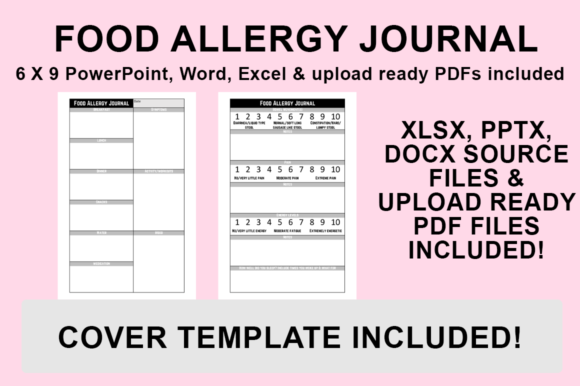
A critical component of using these templates is adhering to the specific technical constraints provided. The KDP Interior - Food Allergy Journal files are sized at 6″x9″ with NO BLEED. Understanding "no bleed" is vital for avoiding rejection during the KDP upload process. In a no-bleed configuration, all content must remain within a safe margin zone. Text, lines, and graphics cannot extend to the very edge of the paper; otherwise, they risk being trimmed off during manufacturing or appearing too close to the gutter binding.
The provided templates come pre-configured with these safety margins. However, when customizing the design, publishers must exercise discipline. Adding new graphics or expanding table widths should always be done with the safe zone in mind. Generally, a minimum margin of 0.375 inches (9.6mm) on the outer edges and 0.5 inches (12.7mm) on the gutter side is recommended for a 6x9 book. Because the source files are already set up correctly, users should avoid altering the master slide size or page setup dimensions unless they fully understand KDP’s printing specifications. Maintaining the integrity of the original canvas size ensures that the final exported PDF will pass Amazon’s automated review system without error.
Differentiation Through Typography and Visual Identity
To make a food allergy journal commercially viable, it must possess a unique aesthetic. Since multiple sellers may utilize similar base templates, the responsibility falls on the creator to inject originality. This is where the ability to choose fonts and add graphics becomes a business imperative rather than a cosmetic afterthought.
Typography plays a functional role in health journals. Users often reference these books while cooking, shopping, or experiencing stress. Therefore, readability is paramount. Publishers should select sans-serif fonts for data entry fields to maximize legibility at small sizes, while potentially using serif or script fonts sparingly for headers to establish brand personality. Furthermore, ensuring sufficient white space around writing areas improves the user experience, preventing the journal from feeling cluttered or overwhelming.
Graphics serve as both navigation aids and emotional connectors. Instead of relying solely on stock photos, consider integrating custom icons that represent specific allergens (e.g., peanuts, dairy, gluten) or symptom severity levels. These visual cues allow users to scan pages quickly. When adding graphics to the PowerPoint or Word source files, ensure they are high-resolution (300 DPI) to prevent pixelation in print. Vector graphics are preferable as they scale infinitely without losing quality, ensuring crisp lines regardless of size adjustments.
Workflow Guide: Exporting Print-Ready PDFs for KDP
The final step in the creation process is converting the customized source files into a format acceptable for print-on-demand manufacturing. While the template includes an upload-ready PDF, any modification necessitates generating a new file. Following a precise export protocol ensures color accuracy, font embedding, and proper sizing.
- Finalize Customizations: Before exporting, conduct a thorough review of the document. Check that all placeholder text has been replaced, fonts are consistent, and no elements violate the no-bleed safety margins. Verify that any added images are embedded and not merely linked.
- Navigate to File Menu: Open your desired file (PowerPoint, Word, or Excel). Go to the ‘File’ tab located in the top ribbon and select ‘Save As’. Do not use ‘Export’ unless necessary, as ‘Save As’ often provides more granular control over PDF settings in certain software versions.
- Select Destination: Choose a dedicated folder for your KDP assets. Organizing files by project prevents version control issues later. Naming conventions should include the trim size and date (e.g., AllergyJournal_6x9_NoBleed_v2.pdf) to distinguish between drafts and final uploads.
- Configure PDF Settings: From the ‘Save as type’ dropdown menu, strictly select PDF (.pdf). Crucially, click on ‘Options’ or ‘Tools’ within the save dialog box before saving. Ensure that ‘ISO 19005-1 compliant (PDF/A)’ is unchecked unless specifically required, but verify that ‘Embed fonts in the file’ is selected. For KDP interiors, selecting ‘Standard’ publishing optimization is usually safer than ‘Minimum size,’ as it preserves print quality.
- Execute Save and Verify: Click Save. Once generated, open the PDF in a dedicated viewer (not a browser) to inspect the output. Zoom in to 100% to check text sharpness and measure margins with a digital ruler tool. Confirm the page count matches expectations and that the document properties reflect the correct 6x9 dimensions.
Practical Applications Across Diverse User Groups
The versatility of an editable KDP Interior - Food Allergy Journal extends beyond individual self-publishers. Various professionals and organizations can adapt these templates for specialized purposes.
Healthcare Practitioners and Dietitians: Nutritionists can customize the journal to align with specific elimination protocols they prescribe. By branding the interior with their practice logo and tailoring the tracking fields to monitor specific biomarkers or reintroduction phases, they create a value-added resource for patients. This transforms a generic notebook into a therapeutic tool that enhances compliance and data collection.
Educators and School Nurses: Schools managing students with severe allergies can adapt these templates to create standardized communication logs between home and school. Modifying the language to be age-appropriate or adding emergency contact sections directly onto the tracking pages ensures that critical information is always accessible. The ability to edit in Word or PowerPoint makes it easy to update these documents annually as regulations or student needs change.
Researchers and Clinical Trial Coordinators: For studies involving dietary interventions, consistent data collection is challenging. Researchers can modify the Excel and Word templates to create uniform case report forms. Standardizing the layout across hundreds of participants reduces data cleaning time and improves the reliability of study outcomes. The no-bleed 6x9 format is also convenient for portable fieldwork.
Content Creators and Influencers: Health bloggers and allergy advocates can use these templates to develop merchandise that complements their digital content. By matching the journal’s aesthetic to their website or social media branding, they create a cohesive ecosystem. The editable nature allows them to include exclusive content, such as personal recipes or community tips, that cannot be found in generic store-bought journals.
Considerations for Long-Term Product Viability
While the technical execution of exporting a PDF is straightforward, the strategic application requires ongoing attention. Publishers should view the source files as living documents. Market trends in allergy management evolve; new allergens emerge, and tracking methodologies shift. Retaining the original PowerPoint, Word, and Excel files allows for future editions without rebuilding the interior from scratch.
Additionally, creators must respect licensing terms associated with any third-party assets added to the template. While the journal structure is editable, any new fonts, clip art, or photographs incorporated must be cleared for commercial print use. Keeping a record of asset licenses protects the business from future legal complications.
Finally, user testing is invaluable. Before launching a customized version, printing a physical proof copy via KDP is strongly advised. Screen rendering differs significantly from ink-on-paper reality. Checking the tactile experience of writing in the journal, the darkness of the lines, and the usability of the binding gap ensures that the final product delivers on its promise of helping individuals manage their health effectively. By combining technical precision with empathetic design, publishers can transform a simple template into an indispensable resource for the allergy community.